The Challenge of Streaming Interfaces
The Challenge of Streaming Interfaces
Streaming interfaces have fundamentally shifted the user's online engagement paradigm. They've ushered in real-time updates, allowing for more dynamic interactions through live data feeds, chat functionalities, transcription tools, and various other systems. While the "live" sensation enhances user engagement, it doesn't come without its challenges—some quite significant.
The Dynamism of the Interface
The essence of modern streaming interfaces lies in their continuous motion. Unlike static platforms where content is unchanging, these systems constantly adapt to incoming data. Elements expand, new blocks make an entrance, and existing content can swiftly disappear or reorient. This fluidity often leads to user frustration. Picture this: you're composing a thoughtful response in a chat, and suddenly, the conversation moves on without you. As messages flood in, maintaining your scroll position can be daunting, leaving you disconnected from essential context and meaning.
It's not just an inconvenience; it can undermine the very essence of communication and interaction. This difficulty isn't limited to chats—it's a pervasive issue across various real-time applications. Users often find themselves lost in a sea of shifting content, struggling to keep pace with modalities that seem to have their own agendas.
Experiencing Streaming Firsthand
To better understand the unique set of challenges posed by streaming interfaces, consider three examples that exhibit both efficiency and struggle: a chat interaction, a log viewer, and a real-time metrics dashboard. Though they differ in execution, each showcases the difficulties of managing user engagement amidst the onslaught of rolling updates—scroll behavior, layout shifts, and rendering frequency are issues that commonly arise across the board.
1. **Chat Responses**: Imagine this scenario: you hit the send button on your message, but instead of instant stability, you witness a gradual build-up. As you strain to scroll up to catch previous messages, the interface could easily yank you back down to the latest post. It's a frustrating dance, with the interface overshadowing user intent and amplifying distractions.
2. **Log Viewer**: This tool streams logs in real-time, allowing users to observe events as they happen. But there’s a catch. The very moment you focus on earlier log entries, the interface often resets to display the most recent updates, disrupting your reading flow and threatening vital insights. It can feel like a game of whack-a-mole where each focused inquiry gets instantaneously derailed.
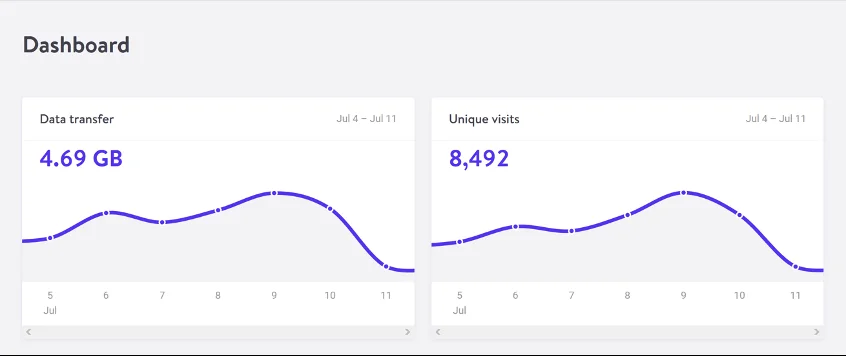
3. **Real-time Dashboard**: Here you may interact with shifting numbers and evolving charts. While it doesn't pose the same scrolling pitfalls as chat interfaces, stability becomes an issue. When metrics change rapidly, the dashboard’s visual presentation can momentarily overwhelm users, making it hard to discern trends or important shifts amidst the chaos of incoming data.
Understanding the Frustration Points
As you explore these demos, you’ll realize just how essential it is to recognize the moments when the interface seems to work against you. That nagging annoyance as the UI disrupts your engagement is exactly where improvements are necessary.
#### The Key Issues
1. **Scroll Behavior**: Automatic scrolling to the latest content can feel like a betrayal of user intent. It disregards users' desires when they're focused on the past. Ideally, when you decide to scroll up, the system should respect that.
2. **Layout Shifts**: Dynamic content can abruptly alter visual arrangements, pushing buttons out of sight or misaligning your current reading location. Such volatility strains user focus and might even lead to errors in more technical applications where attention to detail matters significantly.
3. **Render Frequency**: Browsers generally refresh displays around 60 times per second. However, streaming applications may generate updates much more frequently. The consequence? Performance challenges abound as systems process changes that users might not even register.
Solutions for Enhanced Stability
Creating an effective streaming interface demands a deliberate focus on user experience. This means prioritizing smart auto-scrolling behaviors that don’t violate user intent, stabilizing layouts to mitigate shifting content, and reducing unnecessary screen refresh rates. Consider it a design imperative—taking a proactive stance is critical in alleviating the frustrations we’ve all come to recognize.
It's not merely about bug fixes; it's about crafting a user experience that resonates positively. Adopting these strategies can lead to marked improvements in satisfaction levels across all user demographics. Enhanced accessibility emerges as a crucial advantage. The reality is, when interfaces are smoother and easier to navigate, everyone stands to benefit.
Implications and Future Outlook
What does this mean for developers and designers? The implications of addressing these issues are significant. If you're working in this space, you understand that user experience cannot be an afterthought. Emphasizing stability and intuitiveness might even become competitive differentiators in a market saturated with similar offerings.
In the coming years, you'll likely see a push towards more refined streaming interfaces, as companies recognize the need to cultivate deeper user engagement. With users becoming more discerning, brands that fail to act may find themselves losing market share to those who prioritize user-centric design. Ultimately, as technology progresses, the standards for streaming interfaces will naturally rise, placing user experiences at the forefront of strategic goals.